Integrations
We can integrate with iTero, Dexis, Medit,and DS Core. This allows your scans to be sent directly into Seazona. Your clients can continue sending scans the same way they do now, but instead of logging into multiple IOS portals, you can manage all incoming scans directly from Seazona.
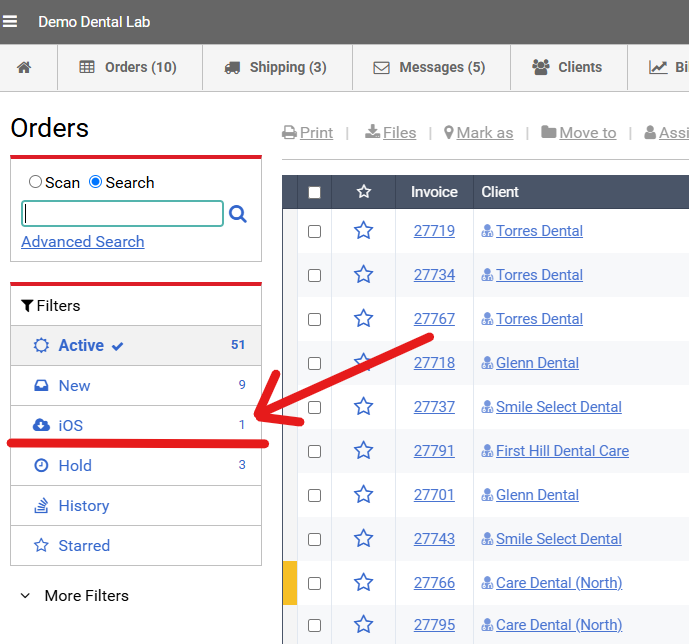
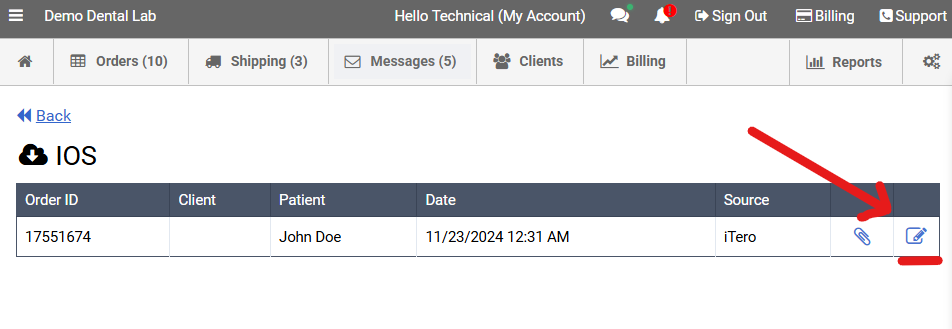
On the Orders page, you will see an IOS filter option once the integration is enabled and scans begin arriving. When a scan is received, simply click the Edit button, complete any missing information, add the product, and then click Save & Close to create the case. All associated scans and notes will already be attached to the case.
To get started, please submit a technical request here. If your account is not currently on the Professional Plan ($129/month), you will need to upgrade before the integration can be enabled. Once upgraded, our IT team will enable the integration settings on your account. After the setup is complete, you will receive an email with authorization instructions. Simply click Authorize to connect the integration.
Please note that some scans can take up to 24 hours to fully synchronize after the integration is enabled. If you are still not seeing scans after that time, please let us know and we will be happy to investigate.
We hope to add additional integration options in future updates.
Please be advised that the service options listed are separate, independent businesses and are not part of Seazona. We recommend reviewing the terms, pricing, privacy policies, and customer reviews of any selected service before making your decision.